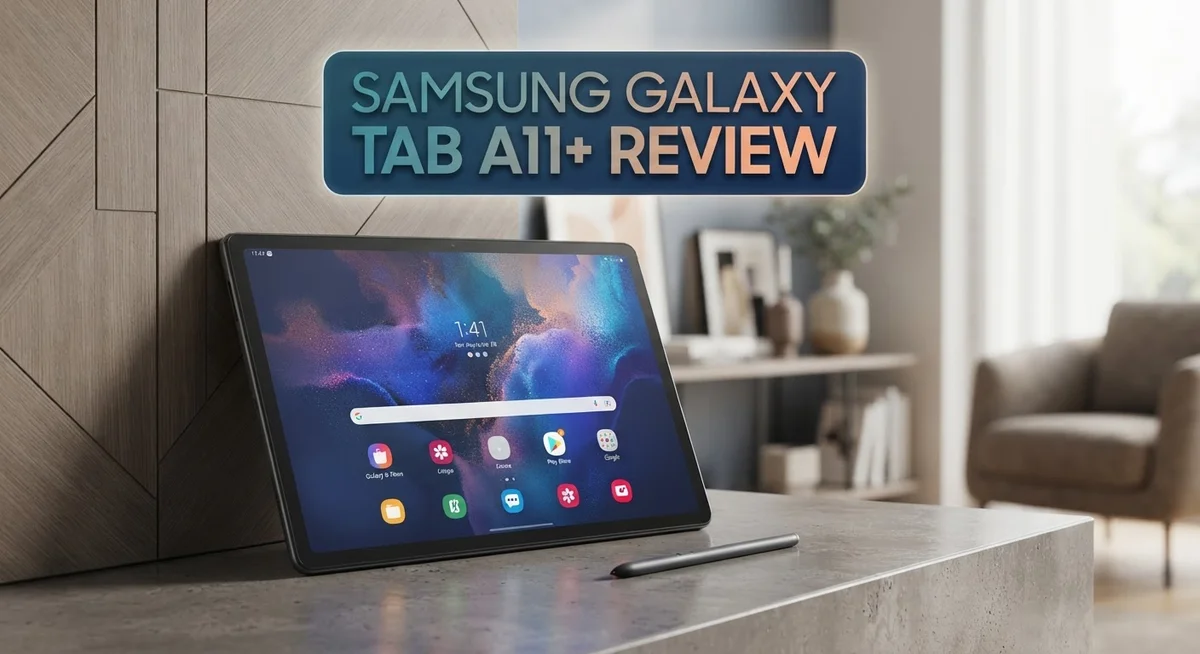
Samsung Galaxy Tab A11+ Review: Features, Performance & Value
Looking for a tablet that fits your daily life without much fuss? The Samsung Galaxy Tab A11+ might be your answer.
This tablet brings a lot to the table. It has a crisp 8.7 inch display with a smooth 90Hz refresh rate. Scrolling and watching videos feel fluid and enjoyable.
Under the hood, the MediaTek Helio G99 chipset powers your daily tasks. You get options from 4GB to 8GB RAM. Storage ranges from 64GB to 256GB, plus expandable space for more files.
The design feels sleek and easy to carry. Whether you stream shows, browse the web, or read books, this tablet handles it well.
Of course, no device is perfect. The charging speed runs slow, and the cameras stay basic.
This review breaks down every detail. You will learn if the Galaxy Tab A11+ suits your needs. Let’s explore what makes this tablet worth your attention.
In a Nutshell
Here is a quick summary of what makes this tablet worth your attention.
- The 8.7 inch display runs at a smooth 90Hz refresh rate. Videos and scrolling feel fluid and crisp.
- A 5100 mAh battery keeps you going through long days. You get solid screen time for streaming and browsing.
- The 8MP rear camera handles basic photos and video calls well. Do not expect pro level shots though.
- Storage options range from 64GB to 256GB. You can also expand it further with a microSD card.
- Compared to the Galaxy Tab A9 and A9+, this model offers a bigger screen and better display tech. The iPad Mini still leads in raw power.
- Charging speed is slower than some rivals. Plan ahead if you need a quick top up before heading out.
- Overall, this tablet suits everyday users. It handles browsing, streaming, and light multitasking without trouble.
If you want a portable tablet with a great screen and long software life, this one fits the bill nicely.
Display and Design
The display on this tablet stands out as one of its strongest features. You get an 8.7 inch screen with a 1340×800 resolution that delivers clear visuals for everyday tasks. The real magic happens with the 90Hz refresh rate, which makes scrolling feel smooth and responsive. Whether you’re reading articles, browsing social media, or watching videos, the experience feels polished.
The screen size strikes a nice balance. It’s large enough to be useful for work and entertainment, yet compact enough to hold comfortably in one hand. This makes the tablet genuinely portable compared to larger competitors. The display brightness and color accuracy work well for indoor use and typical viewing angles.
Design and build quality matter just as much as what’s on screen. This tablet feels lightweight and sleek in your hands. The body design emphasizes portability without sacrificing durability. Samsung kept the bezels reasonable, so you get more screen real estate without the tablet becoming unwieldy.
The overall thickness and weight make it easy to slip into a bag or backpack. If you travel frequently or move between rooms often, you’ll appreciate how easy it is to carry. The device doesn’t feel cheap or flimsy when you hold it. The materials used feel solid and reliable for daily use.
One thing to note is that the design prioritizes function over flashiness. You won’t find premium materials like metal frames throughout, but the construction still feels confident and sturdy. The tablet sits flat on tables and doesn’t wobble easily.
The button placement feels intuitive. Volume controls and the power button are positioned where your fingers naturally reach. The speaker placement allows decent audio without blocking sound during use. These small design choices show Samsung thought about how people actually use tablets day to day.
For someone seeking a screen that performs well combined with a form factor that’s easy to handle, this tablet delivers on both fronts. The display tech and physical design work together to create a device that feels right for casual users and frequent travelers alike.

- 8.7 Inches, 90Hz Display (220.5mm), 1340 x 800 (WXGA+), TFT, 16M colors, Android 15, One UI 7, with...
- 64GB ROM, 4GB RAM, Mediatek Helio G99 (6nm), Octa-core, Mali-G57 MC2 GPU, MicroSD card slot for upto...
Last update on 2026-09-26 / Affiliate links / Images from Amazon Product Advertising API
Performance and Processing Power
The MediaTek Helio G99 chipset sits at the heart of this tablet. It handles your everyday apps, web browsing, and streaming without hiccups. You won’t face lag when switching between tasks or opening multiple apps at once.
This processor excels at smooth multitasking. The 4GB to 8GB RAM options give you plenty of breathing room. Apps load quickly and stay open in the background without crashing. For basic work tasks, email, and social media, this chip performs admirably.
Gaming is where you’ll notice some limits. The Helio G99 isn’t built for demanding 3D games or heavy graphics processing. Casual games and lighter titles run fine, but don’t expect console-level performance. If mobile gaming matters to you, this tablet takes a step back compared to flagship models.
Real world usage tells a different story than raw specs alone. Most people use tablets for browsing, reading, and video watching. This chipset handles those jobs without breaking a sweat. The 90Hz display makes everything feel snappier and more responsive than it actually is.
One honest note: the CPU performance is slower than the older Galaxy Tab A9 model. This seems counterintuitive, but it’s worth knowing. The newer processor focuses on efficiency rather than raw speed. You get better battery life and cooler temperatures as a trade off.
The 8GB RAM variant is the sweet spot if you plan to keep this tablet for several years. It future proofs your device against upcoming apps that demand more memory. The base 4GB model works fine today but may feel sluggish down the road.
Processing power matters less than you might think for tablet users. Most people aren’t rendering videos or running complex software. The Helio G99 delivers enough grunt for real world needs. It keeps the device running smoothly throughout your day without unnecessary power drain.
Camera and Multimedia
The camera system on the Galaxy Tab A11+ keeps things simple and straightforward. You get an 8MP rear camera that handles basic photography and video recording without fuss. For everyday snapshots, document scanning, and video calls, this setup works fine.
The rear camera captures 1080p video, which is solid for most users. You won’t get cinema quality, but the footage looks clean for social media sharing and casual recording. The camera app on Android 15 includes basic editing tools built right in.
The front facing camera handles video calls and selfies adequately. It’s not the star of the show, but it gets the job done for Zoom meetings and family chats. The wide angle lens helps fit more people in the frame during group calls.
Video playback is where this tablet truly shines. The 90Hz display makes watching movies and YouTube videos feel incredibly smooth. Colors pop nicely on the screen, and the refresh rate eliminates that stuttering feeling you get on slower displays. The speakers deliver decent audio without being exceptional.
One thing to remember is that this tablet isn’t designed for photography enthusiasts. The camera performance sits at the basic end of the spectrum. If you need professional grade imaging, you’ll want to look elsewhere. For casual users who snap photos occasionally, the 8MP rear camera does the job.
The MediaTek Helio G99 chipset handles video processing smoothly without lag. Apps load quickly, and streaming video plays without interruption. The 4GB or 8GB RAM options both support multitasking while watching content.
Storage expandability matters here. You can add a microSD card to save photos and videos without filling up the internal storage. This flexibility lets you keep more media on your tablet longer.
Overall, the camera and multimedia experience fits the tablet’s purpose. It’s a content consumption device first, not a content creation tool. For watching shows, browsing photos, and enjoying media, the Galaxy Tab A11+ delivers a smooth, pleasant experience that matches its intended audience perfectly.
Top 3 Alternatives
Apple iPad Air

- WHY IPAD AIR — iPad Air with the Apple M4 chip packs even more performance into a beautiful...
- PERFORMANCE AND STORAGE — The M4 chip delivers advanced graphics and incredible performance for...

Last update on 2026-09-26 / Affiliate links / Images from Amazon Product Advertising API
The iPad Air gives you a powerful tablet experience. It has a fast processor that handles apps, games, and videos without lag. The screen shows bright colors and sharp details.
You get access to the Apple App Store, which has many quality apps. The device works well with other Apple products if you own an iPhone or Mac. Battery life lasts all day with normal use.
The iPad Air feels premium and light in your hands. It supports a stylus for drawing and note-taking. You can use it for work, school, or entertainment.
Lenovo Tab P11

- POWER YOUR STUDY, FUEL YOUR PLAY – Discover smarter learning with the Lenovo Idea Tab. Stay...
- SMOOTH, POWERFUL, IMMERSIVE – The MediaTek Dimensity 6300 processor is more powerful than ever...
Last update on 2026-09-26 / Affiliate links / Images from Amazon Product Advertising API
The Lenovo Tab P11 offers great value for everyday tasks. It has a large screen that’s perfect for reading, watching shows, and browsing. The battery keeps running for hours.
This tablet runs Android, so you can install apps from the Google Play Store. It handles multiple tasks at once without slowing down. The speakers sound good for media consumption.
The Lenovo Tab P11 works well for students and professionals. You can connect a keyboard for typing documents. It’s lighter than many competitors, making it easy to carry around.
Amazon Fire HD 10

- Do what you love, uninterrupted — 25% faster performance than the previous generation and is ideal...
- High-def entertainment — A 10.1" 1080p Full HD display brings brilliant color to all your shows...
Last update on 2026-09-26 / Affiliate links / Images from Amazon Product Advertising API
The Amazon Fire HD 10 connects you to Amazon services instantly. It comes with Alexa built in, so you can use voice commands. The screen size gives you plenty of space for reading and videos.
This tablet is simple to use for beginners. You get quick access to Prime Video, books, and music through Amazon. The interface focuses on Amazon content and services.
The Fire HD 10 works great for family use. Kids can enjoy games and educational apps. It’s affordable and reliable for basic tablet needs like streaming and reading.
Battery Life and Charging
The 5100 mAh battery in this tablet handles a full day of typical use without breaking a sweat. You get solid endurance whether you’re browsing, reading, or streaming content. Real world performance depends on your screen brightness and how much you multitask, but most users report comfortable all day battery life.
Charging speed is where this tablet shows its weakness. The charger takes longer to fill the battery compared to newer tablets on the market. If you need quick top-ups between activities, this might frustrate you. Plan ahead and charge overnight or during downtime instead.
The 90Hz display does consume more power than standard 60Hz screens, yet the battery still holds up well. This shows Samsung balanced performance and efficiency nicely. You won’t feel the need to hunt for an outlet constantly during your day.
For heavy users who stream videos or play games for hours, you might see the battery dip into the evening. The MediaTek Helio G99 chipset manages power consumption reasonably, so drain isn’t excessive. Lighter tasks like reading or web browsing stretch battery life even further.
Battery health degrades over time with any device. The good news is that this tablet supports removable storage and software updates for 7 years. You can keep using it long term without worrying about immediate replacement.
Charging accessories matter too. Use the included charger for best results. Third party chargers work but may charge slower. Keep your charger handy since the slow charging means you’ll want to plan charging sessions.
The battery capacity itself is respectable for a tablet this size. It’s not the largest capacity available, but it’s adequate for the screen size and processor. Most everyday users find the battery life meets their needs perfectly.
If you travel frequently or spend long hours away from power outlets, bring a portable charger as backup. This simple step ensures you never run dry during important moments. Overall, the battery performs reliably for daily tasks and travel scenarios.
Software and Long-Term Support
The Galaxy Tab A11+ runs Android 15, giving you access to the latest features and security patches right out of the box. Samsung commits to seven years of operating system updates for this device. This means your tablet stays current with new Android versions until 2031.
Long-term software support matters more than people realize. Most budget tablets only get two to three years of updates. The seven-year promise here sets the Tab A11+ apart from competitors. You won’t feel pressured to upgrade just because your device falls behind on security patches.
Security updates arrive regularly throughout those seven years. Samsung prioritizes critical fixes that protect your personal data and online accounts. Even after the operating system stops updating, you’ll still receive monthly security patches. This approach keeps your tablet safe from emerging threats.
The Android 15 interface feels clean and intuitive on the 90Hz display. Apps launch quickly thanks to the combination of software optimization and the Helio G99 processor. Multitasking remains smooth when you switch between several apps at once. The 8GB RAM variant ensures this stays true even after a few years of use.
Updates don’t slow down older devices on this tablet. Samsung’s software engineers avoid the bloat that sometimes plagues aging hardware. Your Tab A11+ should perform similarly in year five as it does today. This reliability makes it a solid choice for keeping longer than typical tablets.
The expandable storage means you can add more apps without worrying about running out of space. Combined with seven years of updates, this flexibility extends the tablet’s useful lifespan considerably. You won’t need to delete apps to make room for new Android versions.
Samsung’s commitment to long-term support reflects confidence in this device’s durability. The combination of seven years of OS updates, regular security patches, and expandable storage creates a tablet that ages gracefully. Users who plan to keep their device for five to seven years will appreciate this approach far more than those seeking the latest flagship experience.
Pros and Cons
Pros
- Lightweight and slim design makes it easy to carry in a bag or hold for extended periods
- 90Hz refresh rate delivers smooth scrolling and fluid animations across apps and videos
- Seven years of Android OS updates guarantee long term software support and security patches
- Expandable storage lets you add microSD cards up to boost capacity without replacing the device
- Clean Android 15 interface feels responsive and intuitive on the display
Cons
- Charging takes longer than competitors, so plan ahead before extended trips away from outlets
- Rear and front cameras capture basic quality photos and video compared to premium tablets
- MediaTek Helio G99 processor handles everyday tasks but struggles with demanding games and heavy multitasking
- Processing power lags behind the older Tab A9 models in real world performance tests
Who Should Buy It
The Galaxy Tab A11+ works best for people who need a portable device for everyday tasks. If you watch videos, read emails, or browse the web regularly, this tablet fits your needs perfectly.
Students find real value here. The 8.7 inch display gives you enough screen space for reading textbooks or watching online classes. The lightweight design means you can slip it into your backpack without strain.
Content creators on a budget should consider this model too. The expandable storage lets you save photos, videos, and documents without constantly deleting files. You can add a microSD card and keep creating without storage limits.
Casual gamers will appreciate the 90Hz refresh rate. Scrolling feels smooth, and animations look fluid. However, the MediaTek Helio G99 chipset won’t handle demanding games like high end titles. Light games and everyday apps run without problems.
Travelers benefit from the portable design and decent battery life. A full day of mixed use keeps this tablet running. Just remember that charging takes longer than other tablets, so pack your charger when you leave home.
Long-term users should pay attention to the seven year software support promise. Android 15 updates and security patches will arrive for years. Your device stays current and protected without feeling outdated.
The Galaxy Tab A11+ isn’t ideal for professionals needing heavy processing power. Video editors, photo processors, and power users should look elsewhere. The basic cameras also mean this isn’t a photography device.
People who demand fast charging speeds might feel frustrated. The slow charging means you need patience before extended trips. Plan your charging time accordingly.
Families work well with this tablet too. Kids can use it for educational apps and videos. Adults can handle work emails and documents. The clean Android 15 interface feels intuitive for all ages.
Skip this tablet if you need the fastest performance or premium cameras. Choose it if you value portability, smooth everyday performance, and years of software support.
Final Verdict
The Samsung Galaxy Tab A11+ earns its place as a solid everyday tablet. It blends a smooth display, a slim build, and long software backing into one package. This combination makes it a smart pick for many users.
Compared to the Xiaomi Redmi Pad 2, the Tab A11+ offers stronger software longevity. Samsung’s update promise gives buyers more peace of mind over time. That edge matters for anyone who keeps a device for years.
Against the iPad Mini, this tablet takes a different path. It skips premium materials and top tier chips. Instead, it focuses on practical daily use without unnecessary extras.
The Galaxy Tab A9+ still exists as a sibling option, but the A11+ pushes the screen size and refresh rate further. That upgrade alone shifts the experience toward smoother visuals and easier multitasking.
Performance stays modest on this device. The Helio G99 chipset handles browsing, streaming, and note taking well. Heavy multitasking or demanding apps can push it to its limits.
Build quality feels solid for its class. The tablet holds up well during regular handling and travel. It does not feel fragile or cheaply made despite its lighter body.
Anyone who wants a simple, reliable tablet for daily tasks will likely enjoy this model. It fits nicely into routines built around reading, browsing, streaming, and light creative work.
Buyers chasing flagship level power should look elsewhere. The chipset and camera setup limit its appeal for demanding professional tasks. That tradeoff keeps the tablet approachable for its intended audience.
Overall, the Galaxy Tab A11+ delivers a balanced package. It mixes a pleasant display, dependable software support, and a practical design into one tablet. For most everyday users, that mix creates real value.
If your needs stay simple, this tablet handles them with ease. It stands as a dependable companion for work, study, and entertainment alike.
Frequently Asked Questions
Does the Galaxy Tab A11+ support stylus input?
No, this tablet does not include stylus support. The screen responds to touch input only. If you need a stylus for drawing or note-taking, you may want to explore other tablet models designed for that purpose.
How long does the battery last on daily use?
The 5100 mAh battery gives you solid everyday performance. Most users get through a full day of light to moderate tasks like browsing, reading, and video watching. Heavy gaming or streaming may reduce this time.
Can I expand the storage later?
Yes, you can add a microSD card to boost capacity. This means you don’t need to pick the highest storage option upfront. Just insert a card into the dedicated slot when you need more space.
Is the Galaxy Tab A11+ good for gaming?
The 90Hz refresh rate makes scrolling and casual games feel smooth. However, the MediaTek Helio G99 chipset has modest processing power. You’ll enjoy lighter games fine, but demanding titles may struggle. This tablet works best for casual gaming rather than intense 3D games.
How many years of software updates will I get?
Samsung promises seven years of Android OS updates for this model. You’ll receive security patches and new features throughout that period. This long support window means your tablet stays current and secure for a very long time.

Hi, I’m Juli! I’m a tech enthusiast with a passion for discovering and testing the latest gadgets and AI innovations. I created GearGaze to share honest, practical insights that help you make smarter tech decisions.